How to Estimate Photography Labor Before Quoting a Shoot
· FlashFilm Academy
To estimate photography labor, list the work needed before, during and after the shoot, assign the hours to each person, and apply the relevant internal labor allowance or agreed crew rate. Keep that labor estimate separate from the final client price, which may also need to cover expenses, overhead, usage and profit. Four hours of photography can require substantially more than four hours of work.
This guide helps photographers and videographers build a useful estimate before sending a proposal. It also explains how FlashFilm Academy's Structure Base Pricing Calculator can support the pricing conversation, and what you still need to decide yourself.
Start with the work the client is actually buying
A request for “a half-day shoot” leaves several decisions open. How many locations, people and finished images are involved? Who prepares the subjects? Does the client need basic finishing, detailed retouching or multiple delivery formats? A short appointment with many final deliverables can require considerable post-production.
Write a scope statement before estimating hours. For example: one office location, six team portraits, twelve finished images, one consolidated selection process and one agreed delivery. This is a fictional planning example, not a recommended package or a promise about how quickly a real team can work.
Our video production brief template covers the questions to confirm before production. The same habit helps a photography estimate: make the deliverables and open decisions visible before assigning a number.
Count the work outside the appointment
Build your task list around the assignment rather than the time the client expects you to hold a camera. Include the work you actually intend to provide.
- Preparation: discovery, coordination, schedule, permissions, packing and any necessary location planning.
- Production: travel where applicable, load-in, setup, testing, photography, changes between setups and wrap.
- Post-production: ingest, backups, image selection, agreed finishing or retouching, review, revisions and delivery.
- Administration: preparing the proposal, arranging crew, invoicing and managing the handoff.
Avoid counting the same task twice. If your internal production allowance already includes a particular preparation task, record that inclusion rather than adding it again under another label. Conversely, a task does not disappear because you choose to bundle it into a single client-facing fee.
The AIA and ASMP's guide to commissioning photography explains that production work can include preparation and post-production, alongside the time spent photographing. It also distinguishes production or creative fees, licensing and expenses. Use those categories to check completeness, not as a current rate card.
Give each person their own hours
Crew size and elapsed time answer different questions. A photographer working four hours with one assistant does not necessarily create eight person-hours for the whole project. The photographer may also handle planning and editing. The assistant may have a separate setup period or a booking minimum.
Create a line for each role. Record the task, estimated hours or booked day, the applicable rate or internal allowance, and what that rate includes. Confirm the actual arrangement with the person doing the work. Different people can have different rates and different working periods.
For an internal hourly calculation, multiply each role's estimated hours by that role's planning allowance, then add the results. If a crew member quotes a day fee, minimum booking or another basis, use that actual arrangement instead of converting it into an hourly rate that changes the agreed price.
Worked example: four shoot hours and nineteen person-hours
Consider a fictional office portrait assignment. These hours and dollar amounts illustrate arithmetic only. They are not market rates, wage recommendations or a client quote.
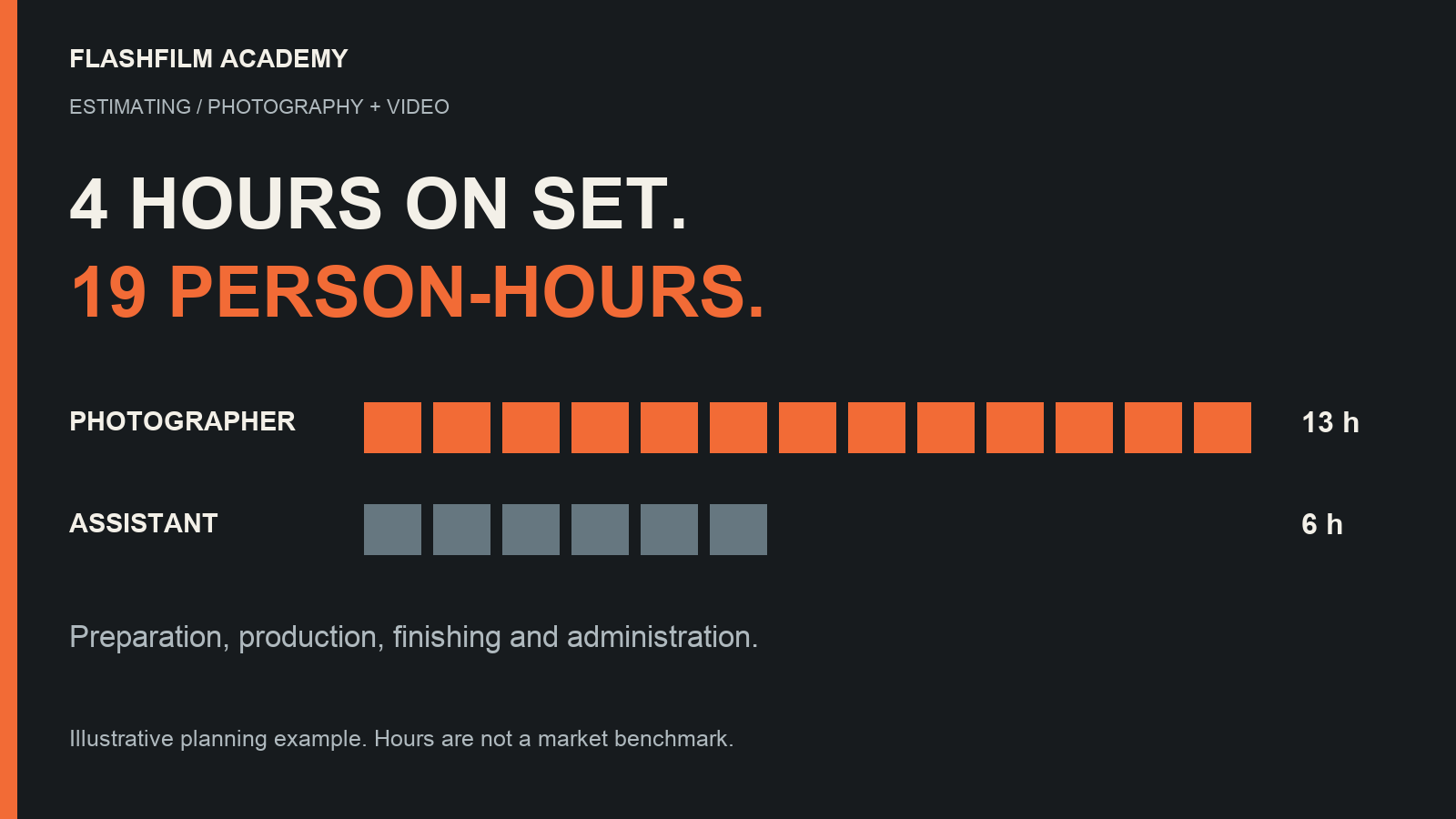
- Photographer: two hours preparing, four photographing, one backing up and organizing files, five finishing images, and one handling administration. Total: thirteen hours.
- Assistant: six booked hours covering their agreed preparation, setup, shoot and wrap responsibilities.
- Total planned labor: thirteen plus six equals nineteen person-hours, although the photography appointment lasts four hours.
If the photographer uses an illustrative internal allowance of $60 per hour, thirteen hours produces $780. If the assistant's hypothetical agreed charge is six hours at $30, that adds $180. The combined labor planning amount is $960.
That $960 is not automatically the final selling price. The example has not added project expenses, an overhead allocation, any separately priced usage or a profit decision. It also has not established actual crew terms. Keep those decisions explicit rather than calling whatever remains after the assistant is paid “profit.”
Now suppose the client adds twelve more finished photographs. The appointment might remain four hours, while selection, finishing and review time increase. Re-estimate those tasks before accepting the change. For managing that conversation, see our guide to defining revision rounds and added deliverables.
Use the Structure Base Pricing Calculator with checked inputs
Inside the Academy's Tools & Templates, the Structure Base Pricing Calculator provides an Excel workbook and supporting lessons. The current downloadable version, Structure Pricing Cal V1.3, includes inputs for a day rate, member count, days and shoot hours, plus adjustable rate percentages for individual members.
This is a structured pricing model. It combines a base component with an additional hourly component and the member-rate percentages. It does not use the simple hours-times-labor-allowance method from the separate example above. Keep those two calculations distinct so you understand what each result represents.
Before using the workbook on a real estimate:
- Save a project copy and decide what your entered day rate represents.
- Review every included member's percentage. In the current file, later member rows start at zero, so increasing the member count alone may not add the allowance you expect.
- Check the day count and shoot hours against the actual production plan.
- Compare a simple test case with an independent calculation, then inspect the changed result when you vary one input.
- Record expenses, usage, overhead and other decisions the workbook does not separately capture.
We inspected the current workbook and checked four input scenarios by recalculating test copies in LibreOffice. Its displayed outputs round upward to whole numbers, so multiplying a rounded hourly display can differ from the project total calculated from the underlying values. Review the total rather than rebuilding it from rounded display cells.
No spreadsheet can determine whether your assumptions match the job or whether a client will accept the resulting price. The supporting training and your actual project records matter as much as entering the numbers.
Keep labor, business overhead and selling price clear
Project labor describes the work assigned to this job. Business overhead includes costs you incur to keep operating, including time and expenses that do not belong to one assignment. The selling price also reflects the service and rights you agree to supply. Decide how your own pricing structure accounts for each item, and check for omissions or double counting.
ASMP's discussion of establishing a photography fee identifies overhead, assignment complexity, image quantity and intended use among the considerations. That supports a broader pricing review after the labor estimate. It does not establish a universal price or profit percentage for your business.
Compare estimated hours with the completed job
After delivery, record actual time by the same tasks you estimated. If finishing took eight hours instead of five, identify the reason. Perhaps there were more selected images, a different retouching expectation or scattered feedback. Adjust the next estimate or clarify the package, rather than automatically assuming you worked too slowly.
Keep a short note with the project: estimated hours, actual hours, the scope change and what you would confirm next time. Over several jobs, your own records become more useful than guessing from a competitor's appointment length.
Get the calculator and training through paid membership
To use the Structure Base Pricing Calculator alongside the Academy's training, join FlashFilm Academy and access Tools & Templates. New memberships currently cost $39 billed monthly or $349 billed annually. This is recurring membership access, not a standalone calculator purchase. Separately sold contract products are distinct from membership.
Existing paid members can open the Structure Base Pricing Calculator space with their Academy account. Use the current lesson and workbook together, then bring questions about your assumptions to the community. Membership does not guarantee project profitability or client acquisition.
Want a free starting point? Get the Free Prompt Kits and use Hidden Work Tracker to identify preparation, travel, editing, review and delivery time you might have missed. Create or sign in to an Academy account first, opt into Academy marketing emails, and confirm your subscription when prompted. No paid membership is required for the free kits. You can unsubscribe from marketing emails.
Questions about photography labor estimates
Should I estimate by the hour or by the day?
Use the basis that matches the actual work and crew agreements. Hours help expose preparation and post-production. A day fee or booking minimum can better describe a crew commitment. Record what each basis includes before combining the figures.
Does a four-hour shoot mean a half-price project?
There is no automatic relationship. Planning, travel, setup, editing and delivery may remain similar even when the photography period becomes shorter. Recalculate the actual scope instead of dividing a previous quote in half.
Is the pricing calculator included with the free prompt kits?
No. Hidden Work Tracker is a free prompt kit with its own account and marketing opt-in requirements. The Structure Base Pricing Calculator is a paid Academy Tools & Templates resource. The membership page explains the monthly and annual options.
YOUR NEXT STEP · START FREE
Take one useful step toward a stronger creative business.
Get ten free prompt kits for photographers and videographers. Research buyers, clarify your offer, track hidden work or prepare for shoot day—then check the results against real evidence.
Get the free prompt kitsEnter your email for a free community access invitation and Academy emails. Unsubscribe anytime. Already a member? Open this resource with your existing account.
Build on your first step with structured training and community. Explore Academy membership.
Join the conversation.
Read along, ask a question, or share your experience. Comments are open to active FlashFilm Academy members.
Loading comments…