How to Compare Two Photography Packages in a Client Proposal
· FlashFilm Academy
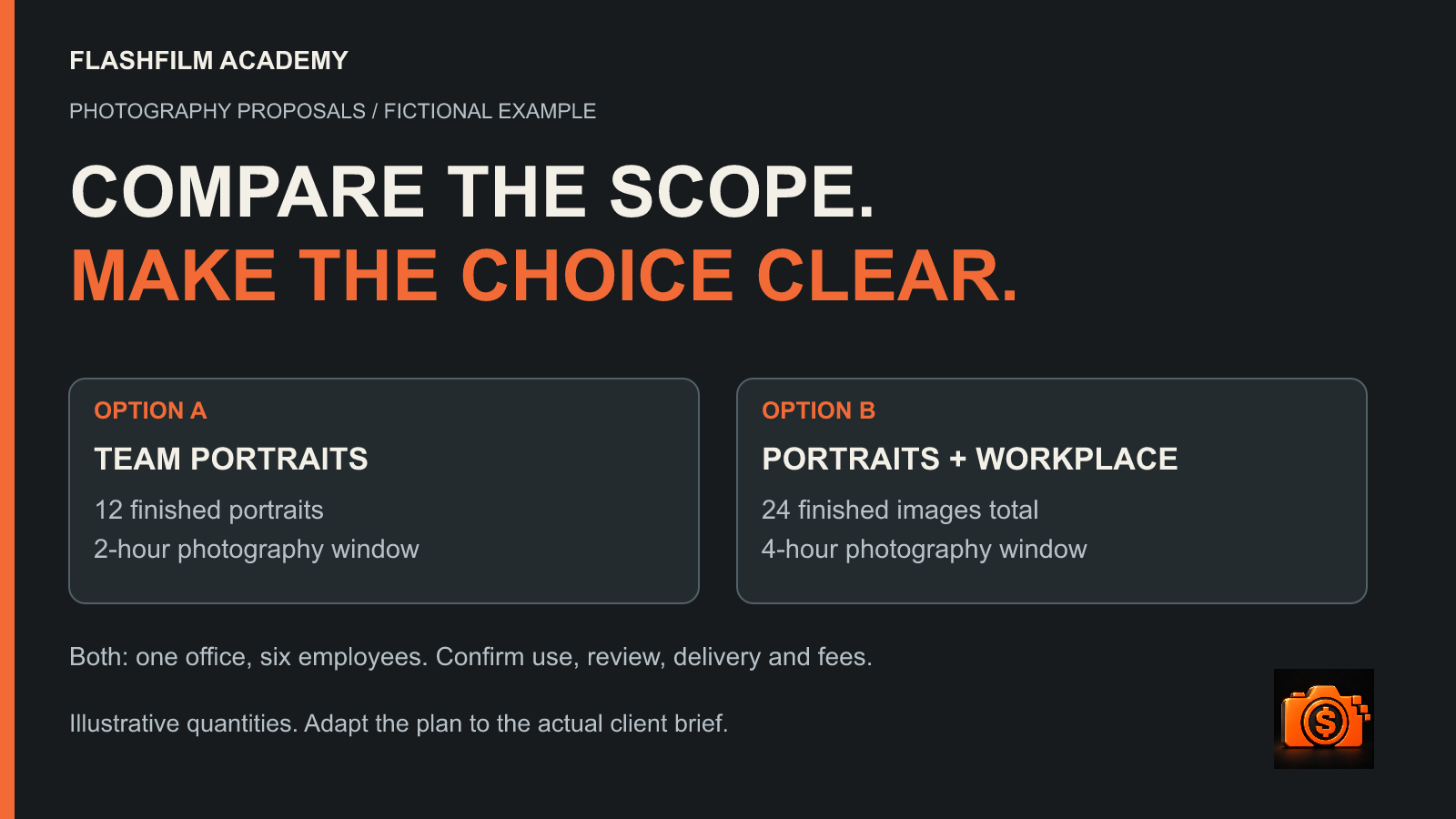
Compare photography packages by putting the same scope details in the same order for each option: intended use, coverage, finished image count, retouching, delivery, client responsibilities and price. Explain which client need each option serves, then give one clear way to select it. The reader should be able to identify what changes between the options without hunting through two different brochures.
This guide is for photographers preparing proposals for business clients. Videographers can use the same comparison method for finished films and production scope. The aim is a clearer buying decision grounded in work you can deliver, rather than a larger package built from vague promises.
Start with one confirmed client brief
Write a short shared project statement before building options. For example: “The client needs current team portraits for its website and organic social profiles, photographed at one office.” Confirm who needs to appear, where the photographs will be used, the deadline and the person who can approve the work.
Separate requirements from possible additions. If the client needs a complete team roster, both options should address that need. More elaborate lighting or additional workspace photographs can be a meaningful difference; omitting an essential employee from the smaller option creates an incomplete solution.
Keep unknowns visible. If access to a second office is unconfirmed, mark that location as an open decision with a deadline. Do not price it as confirmed coverage and hope the logistics work out later.
Use the same comparison rows for both options
Choose labels that describe what the buyer receives and what the project requires. Keep their order identical in both columns of the proposal. Include enough detail to prevent a short label from hiding a different service.
- Purpose: the business use and audience each option is designed to serve.
- Production scope: locations, people, coverage window and the preparation needed from the client.
- Deliverables: the number of finished images, required views, file formats and agreed crops.
- Finishing and review: the retouching included, selection method, feedback owner and review limits.
- Usage: the named client, placements, duration and other agreed boundaries.
- Schedule: client-input deadlines, selection date and delivery timing.
- Investment: the option total, currency, treatment of expenses and applicable tax, plus separately selected extras.
- Next step: who selects the option and how the scope, agreement and booking process will be completed.
Avoid mixing unlike units. “Two hours” describes a production window; “twelve finished images” describes delivery. Both can matter, and one does not tell the client the other. Define whether setup is inside the stated window and what happens if the agreed roster or shot list changes.
Example: portraits or portraits plus workplace photographs
Consider a fictional company with six employees at one office. It needs team portraits now and is considering photographs of the workplace for its website. The following quantities are an editorial example, not an Academy client's project, a standard package or a promise about how fast a real shoot can be completed.
Option A: team portraits
Offer a planned two-hour photography window at the office, covering the six-person roster and twelve finished portraits. Agree the portrait treatment, selection process and delivery specifications. Confirm separately when you may arrive to set up and what space the client must make available.
Option B: team portraits and workplace library
Offer a planned four-hour photography window at the same office, covering the same six-person roster and twenty-four finished images across portraits and an agreed workplace shot list. Define how many selected images belong to each group. Check room access, staff availability and the additional preparation before treating this option as achievable.
Keep the comparison explicit
- Client need: A supplies the agreed portraits; B supplies those portraits plus a defined workplace image library.
- Coverage: A uses a two-hour photography window; B uses four hours. Specify setup and wrap arrangements in both.
- Finished images: A includes twelve portraits; B includes twenty-four total images across the two agreed groups.
- Location and roster: both use one confirmed office and the same six employees.
- Review and delivery: describe the actual process for each; more images may require a different selection deadline or finishing allowance.
- Usage: keep the agreed use consistent unless the client has requested a meaningful change. If it changes, show that change in its own row.
- Price: insert your independently prepared total for each option and explain the included expenses and tax treatment. These example quantities do not establish a suitable fee.
A useful recommendation would be: “Choose A if the current priority is updating the team page. Choose B if the agreed workplace images are also needed for the website refresh.” That explains the fit without promising sales or treating the more expensive option as automatically better.
Keep usage visible beside the image count
A larger image library and broader permission to use it are separate decisions. Ask which organization will use the photographs, where they will appear and for how long. Confirm any advertising, partner or vendor use that needs to be addressed. Use matching language in the option summary and the agreed project documents.
ASMP's Working with an Assignment Photographer organizes an estimate around the assignment description, licensing and pricing. Its discussion includes finished images, delivery, timeframes, fees and expenses. The guide dates from 2005; use it as a planning framework, not a current rate card or a substitute for advice about your agreement.
For a deeper set of client questions, see our commercial photography usage checklist. Keep this comparison focused on the options the client is actually evaluating.
Build each price from its actual scope
Estimate the work behind each option before placing a total in the proposal. More finished photographs can add selection, retouching, review and export work even when the location stays the same. More coverage can affect crew, access, travel or other expenses. Record the assumptions behind your estimate.
Our photography labor-estimating guide explains how to count work across the project. Use that process to check your numbers, then decide how your full selling price accounts for the agreed service and rights. A tidy comparison page does not establish whether the price is viable for your business.
Put optional additions beneath the two complete options. State what each extra adds, its price and any schedule effect. If a request changes the underlying plan, revise the selected scope rather than leaving the client to assemble an uncertain project from a long menu.
Adapt the actual proposal template
Inside Academy Tools & Templates, the space named “7 Brochure Style Proposal Templates” currently provides a refreshed download with nine editable Word variants. We inspected the downloaded November 2026 package, including its Photography Classic and Photography Brochure documents. The space's established name and the current file count differ.
Those photography documents provide working sections for the project summary, deliverables, approved placements and usage, review limits, client materials, dates and dependencies, exclusions, investment and the next step. They also include an optional section for an agreed AI task and its input permissions and human review. Remove that section when it does not apply to the assignment.
Use the document as your working starting point, then add your two-option comparison page. Keep the detailed scope behind the summary aligned with it. Replace every bracketed instruction, write your own project figures, add only imagery you have permission to use and check the exported document before sharing it.
Test the comparison before sending
Read each option on its own. Could the client understand the deliverables, responsibilities and price without asking which parts of the other column also apply? Replace “same as above” where it leaves a material detail unclear.
Then compare the columns row by row. Check image counts, dates, totals, optional items and usage language. View the PDF at a comfortable reading size and on a phone. Keep important differences in text instead of relying only on color or tiny footnotes. Ask a colleague to explain the difference back to you using only that page.
Finish with a concrete decision request: “Please tell us which option you want to discuss and any changes needed to the scope. We will confirm availability and finalize the project agreement and booking steps.” Adapt it to your actual process. Track the selected option, document version and date; do not treat an informal preference as proof that every booking step is complete.
Get the editable templates through Academy membership
Join the paid FlashFilm Academy to access the proposal templates and Tools & Templates library, alongside structured training and community support. The public membership page explains the monthly and annual subscriptions. This is membership access; separately sold contract products have their own purchase terms.
Existing members with access can open the proposal templates space and download the current working files. Bring a comparison with private client details removed to the community for discussion about clarity and scope.
Want a free starting point before drafting the options? Get the ten free Prompt Kits and use Client Problem Finder to organize the buyer problem your offer needs to address. Review AI suggestions against what the real client has confirmed.
The free kits require an Academy account, Academy marketing email opt-in for new access and subscription confirmation when prompted. No paid membership is required for them, and you can unsubscribe anytime. The paid proposal-template library is a separate offer.
Common questions
Should every proposal have two packages?
No. Use two options when each solves a real version of the client's need. A single clear scope can be appropriate when the requirements are settled. Do not add an unsuitable option just to make the other one appear attractive.
Should the bigger package include more image usage automatically?
Decide that with the client. More images, a longer shoot and a wider usage scope describe different changes. Show each relevant difference clearly and carry the selected terms into your agreed project process.
Can I send the template without rewriting the placeholders?
Complete and review it for the actual assignment first. Verify the counts, schedule, permissions, price and next step, remove unused instructions and open the final export. A polished layout is most useful when its details describe the work you intend to provide.
YOUR NEXT STEP · START FREE
Turn your creative skills into a clearer offer.
Join AI to Client, our free 5-day challenge for photographers and videographers. Work on your offer, research potential buyers and prepare a client conversation.
Start AI to Client freeEnter your email for a free community access invitation and Academy emails. Unsubscribe anytime. Already a member? Open this resource with your existing account.
Build on your first step with structured training and community. Explore Academy membership.
Join the conversation.
Read along, ask a question, or share your experience. Comments are open to active FlashFilm Academy members.
Loading comments…