How to Write a 60-Second B2B Video Script
· FlashFilm Academy
To write a 60-second B2B video script, choose one buyer question, explain one useful answer, pair each spoken section with something the viewer can see, and finish with one clear next step. Read the draft aloud and time the complete sequence, including demonstrations and the closing screen, before asking the client to approve it.
For photographers adding video services and videographers producing client work, the difficult part is often deciding what to leave out. A company may have ten services, three audiences and a long history. A minute-long film needs a smaller assignment. This guide shows how to turn an approved brief into a filmable script, with an original fictional example you can adapt to your own planning.
Choose the buyer question before the opening line
Write a working sentence: “After watching, [specific buyer] should understand [one thing] and feel ready to [next action].” For a business selling staff training, that might mean helping an operations manager understand how a workshop is prepared before requesting a planning call. Keep recruitment, company history and every course option for other pieces of content.
Use the client's real questions, sales conversations and approved information. Ask which uncertainty repeatedly delays the next conversation. Do buyers wonder who attends, how much preparation is required, or what happens after an inquiry? Pick one question the business can answer accurately within the proposed production.
Wistia's video scripting guidance recommends clarifying the audience, takeaways and placement before drafting. Apply that planning principle to one specific buyer decision. If those decisions are still open, use our video production brief guide to confirm them first.
Build a five-part outline that fits the assignment
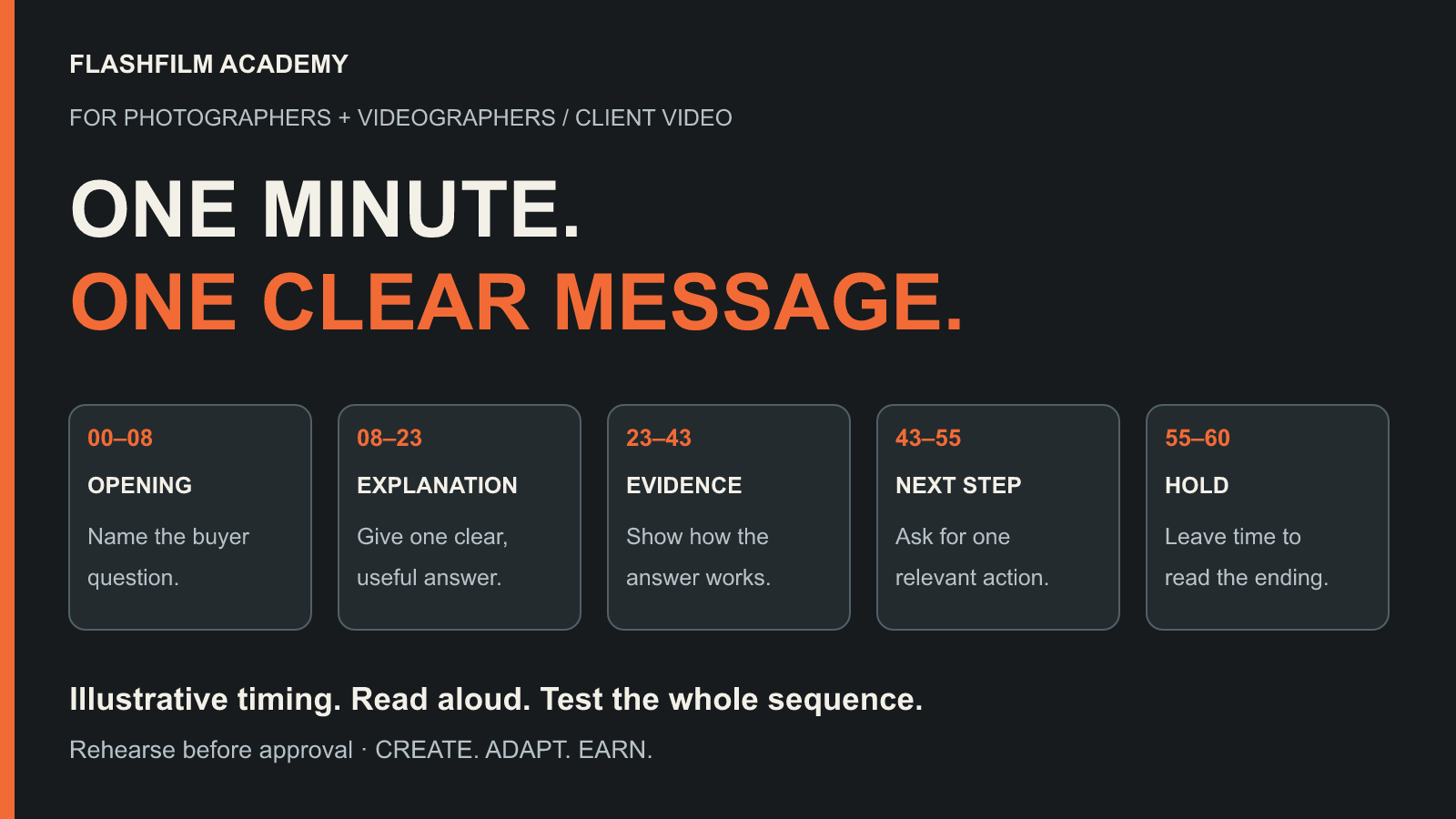
The following time windows are an original planning example, not a required formula or measured performance result. Adjust them after the speaker rehearses. Their purpose is to reserve space for the whole message before detailed wording expands.
Opening, 0–8 seconds: identify the viewer's situation or question. For the training business, a useful opening could ask what the team needs to prepare before a workshop. Write an opening that the rest of the video actually answers.
Explanation, 8–23 seconds: give the essential answer. Show the business's process in plain language. Choose details the client has confirmed, rather than adding claims because they sound persuasive.
Evidence, 23–43 seconds: demonstrate the explanation with observable activity, an approved example or a clearly identified illustration. A facilitator discussing a sample agenda can support a preparation message. An unrelated attractive office shot cannot demonstrate how preparation works.
Next step, 43–55 seconds: say what the viewer can do and what information to provide. Match this instruction to the real destination. “Request a planning call” needs a working way to request that call.
Closing hold, 55–60 seconds: allow time to see the business name and next-step information. Avoid filling every remaining second with new speech. Five seconds is this example's allowance; check the actual design, amount of text and finished playback before deciding whether it is enough.
Write a visual plan beside the spoken words
Create two columns headed VIDEO and AUDIO. Give each row a stable identifier, such as S01, and an estimated duration. In VIDEO, describe the visible action and any essential on-screen words. In AUDIO, write the exact narration or presenter line, plus relevant sound or silence. Each row represents material intended to play together.
For example, “S03: facilitator points to the three agenda sections; on-screen label: Preparation call” is more useful than “nice office footage.” The first description tells the crew what action is needed and tells the reviewer what the shot communicates. You can refine framing and coverage in a separate shot list after the message is approved.
Mark anything unconfirmed. If the example requires a real workshop, identify who will arrange access and permission. If the business cannot provide that scene, revise the script or agree on a labeled demonstration. Do not leave an unavailable scene in the approved document and assume the editor will solve it.
Example: a workshop company's one-minute script
Imagine a fictional company called Northline Workshops. It offers manager-training sessions to local businesses. This is an original planning example, not a customer story or an account of actual results. The imagined client has confirmed a preparation call, agenda review and facilitator-led exercise as its process. A real client must verify its own details.
S01 / proposed 0–8 seconds. VIDEO: the presenter beside a blank sample agenda. AUDIO: “Planning a workshop for your managers? Start with the decisions they need to make at work.”
S02 / proposed 8–23 seconds. VIDEO: presenter and facilitator review the sample agenda; show headings for audience, challenge and session focus. AUDIO: “At Northline Workshops, we begin with a preparation call. Tell us who is attending, what is getting in their way, and what you want the session to address.”
S03 / proposed 23–43 seconds. VIDEO: a clearly labeled demonstration with staff stand-ins; the facilitator explains a sample exercise. AUDIO: “We use that conversation to propose an agenda. You review the focus with us before the workshop. During the session, our facilitator guides your group through an exercise built around the agreed topic.”
S04 / proposed 43–55 seconds. VIDEO: presenter returns; display the approved next-step address. AUDIO: “Want to discuss a workshop for your team? Request a planning call and tell us your group size and the challenge you want to explore.”
S05 / proposed 55–60 seconds. VIDEO: business name and next-step information remain visible. AUDIO: no new narration; let the ending breathe. These windows still need a real timed read and a rough sequence. Nothing here establishes that this speaker, wording and action will fit sixty seconds on the first attempt.
Check duration by performing the script
Read the words aloud at the intended delivery pace. Include pauses, pronunciation, gestures and the time needed to understand the demonstration. Record a rough read, place it against simple scene cards and watch the complete minute. The client's actual presenter should rehearse before the production plan depends on a particular delivery speed.
TechSmith's video marketing playbook recommends a timed read-through to assess wording and length. We use that specific production recommendation here; its older platform-limit table is not a current delivery specification. Confirm current destination requirements separately for your project.
If the draft runs long, remove a secondary idea before asking the presenter to rush. Replace an abstract phrase with a concrete action, or move background detail to the linked page. Retest after every substantial change. A word count is a drafting aid; it does not measure a finished video's pauses, visuals or closing hold.
Review every promise and the next-step destination
Highlight claims about results, availability, turnaround, qualifications and what the service includes. Ask the responsible client contact to verify them and supply appropriate evidence or approved wording. Keep unresolved claims out of the shoot version. A hypothetical demonstration must stay identifiable as a demonstration, including in the eventual edit.
Test the intended destination yourself. Does it open on a phone? Does the page offer the action named in the script? If the video says “request a planning call” but the link only opens a general homepage, ask the client to resolve that mismatch. Record who owns the destination and who will check it before launch.
Get approval on a dated shoot version
Send one version containing the spoken words, essential visual actions, on-screen wording, target duration and open questions. Ask the client's decision-maker to approve those choices explicitly. Keep a record of the approved version so the crew and editor use the same document.
After approval, build the shot list around each row and check locations, participants, assets and time. Use our AI storyboard approval workflow when drawings or concept frames would help resolve a visual decision. Script approval alone does not arrange a location or confirm a person's attendance.
If the client adds a service or changes the message later, assess the effect on length, coverage and delivery before revising the plan. Explain the decision needed rather than quietly fitting another paragraph into an already full minute.
Frequently asked questions
How many words belong in a 60-second B2B video?
There is no single word count that guarantees a sixty-second finished film. Draft concisely, then time the intended speaker and the complete visual sequence. Reserve room for demonstrations, pauses and a readable ending. If it only fits when rushed, simplify the message and repeat the check.
Does every business video need word-for-word dialogue?
A presenter-led explanation can benefit from approved exact wording. For an interview, prepare questions and topics without inventing the person's answers. If your story already exists in recorded interviews, use our interview paper edit guide to select actual source material rather than rewriting it as a fictional quote.
Can AI help write the first draft?
Yes, as a drafting aid. Supply only information you are authorized to use, distinguish approved facts from unknowns, and ask it to flag missing evidence. Check every claim, visual requirement and line of dialogue yourself. A polished AI draft still needs the client's review, a timed read and a feasible production plan.
Start with a clearer client problem
Before writing another opening, identify the buyer question the film should answer. Get the free Academy Prompt Kits, then choose kit 02, Client Problem Finder. Use its suggestions to prepare better questions and verify them with the client; they are not research findings on their own.
No paid membership is required for the free kits. Create or sign in to your Academy account first, opt into Academy marketing emails for new free-resource access, and confirm your subscription when prompted. You can unsubscribe anytime. Existing members can open the free Prompt Kit space. Your chosen AI tool and any usage charges are separate.
For structured creative and business training with community support, explore paid monthly and annual FlashFilm Academy membership. Bring a sanitized script question to the community, share only material you have permission to share, and turn the next lesson into a practical production decision.
YOUR NEXT STEP · START FREE
Take one useful step toward a stronger creative business.
Get ten free prompt kits for photographers and videographers. Research buyers, clarify your offer, track hidden work or prepare for shoot day—then check the results against real evidence.
Get the free prompt kitsEnter your email for a free community access invitation and Academy emails. Unsubscribe anytime. Already a member? Open this resource with your existing account.
Build on your first step with structured training and community. Explore Academy membership.
Join the conversation.
Read along, ask a question, or share your experience. Comments are open to active FlashFilm Academy members.
Loading comments…